产品使用及交流论坛
xiyou - 2009/5/7 11:31:00
pageadmin系统关于网站的结构调整都在后台的栏目管理中,我现在做下面一个类型的结构,希望大家可以从中懂得一些基本用法。我想看完后大家对网站结构的修改就更容易上手,也更容易做出自己想要的网站结构,发这种教程比做网站辛苦,大家多多顶一下:D :D
结构图:


xiyou - 2009/5/7 12:00:00
这里只说首页结构布局制作,比如什么发布文章,logo更换,底部信息这些简单功能就不说了,这些地方用户仔细点就可以找到
下面以一个什么内容和结构都没有的系统来演示1、首先安装好系统并进入到后台,找到栏目管理,一个一个的增加好栏目。
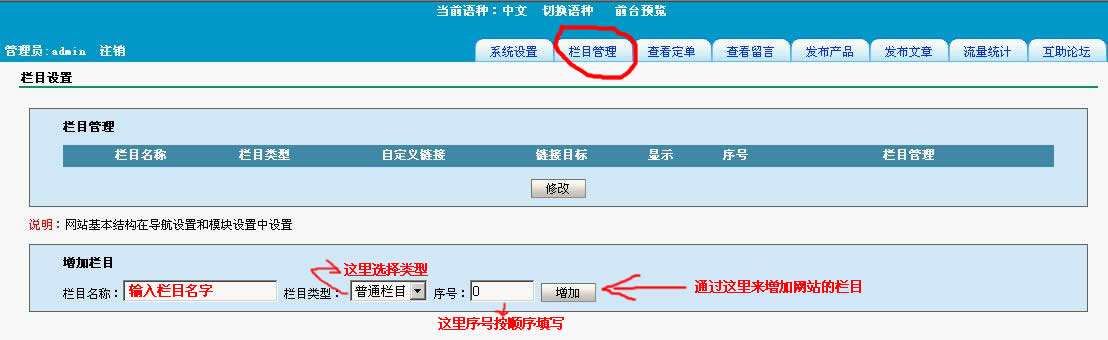
增加好后如下图所示
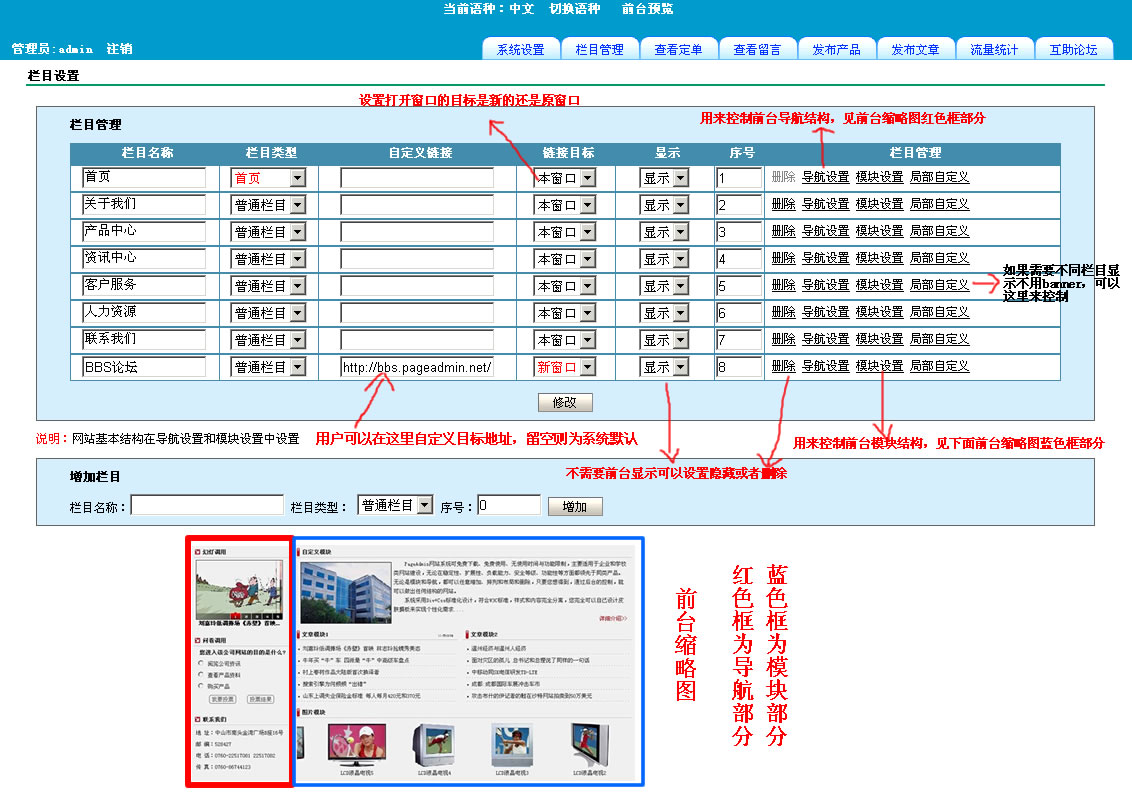
xiyou - 2009/5/7 12:24:00
接下来说一下导航设置中的制作,进入后增加一下以下导航
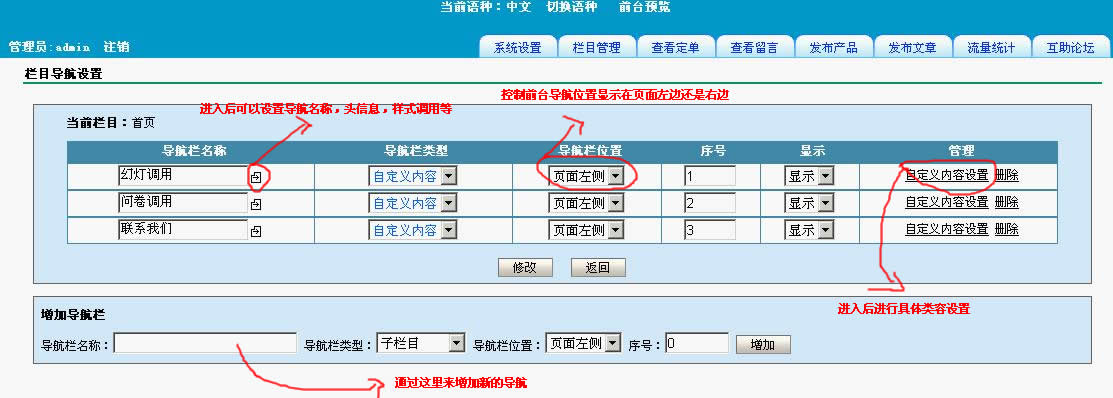
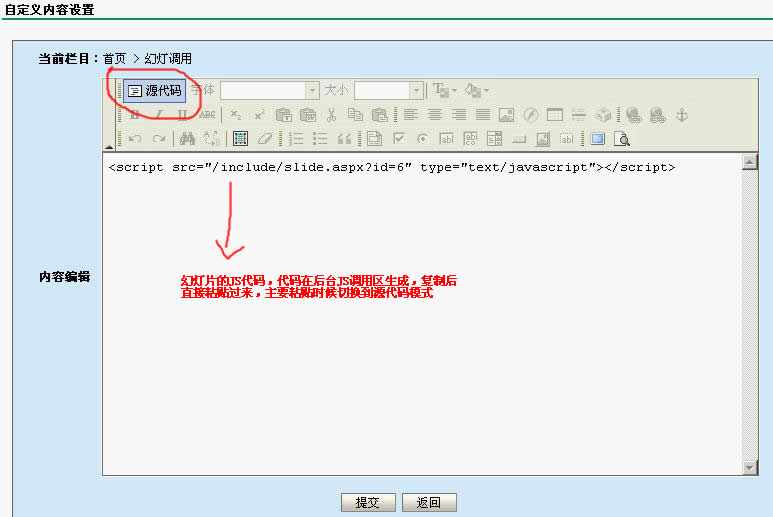
需要注意的是如果用户调用的是JS代码,在编辑器模式中要切换到源代码模式
如图
huawx - 2009/5/7 12:52:00
1、下面来说模块设置中的操作,进入后先增加下面的几个模块,类型注意选择
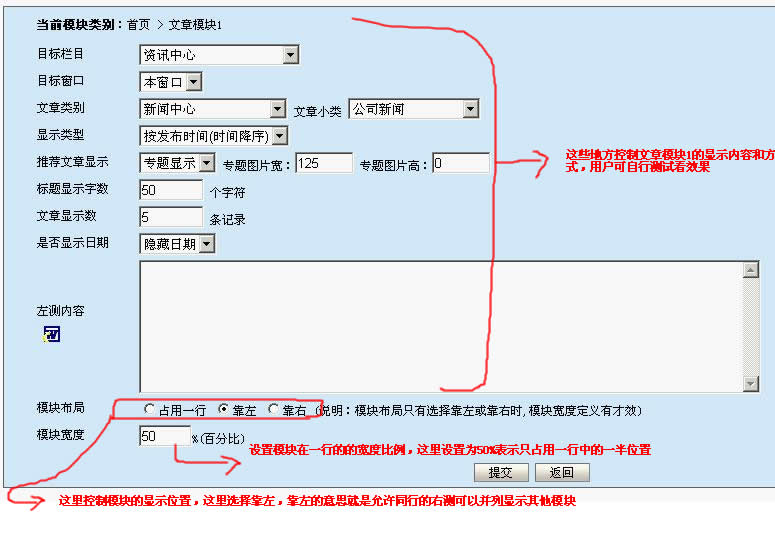
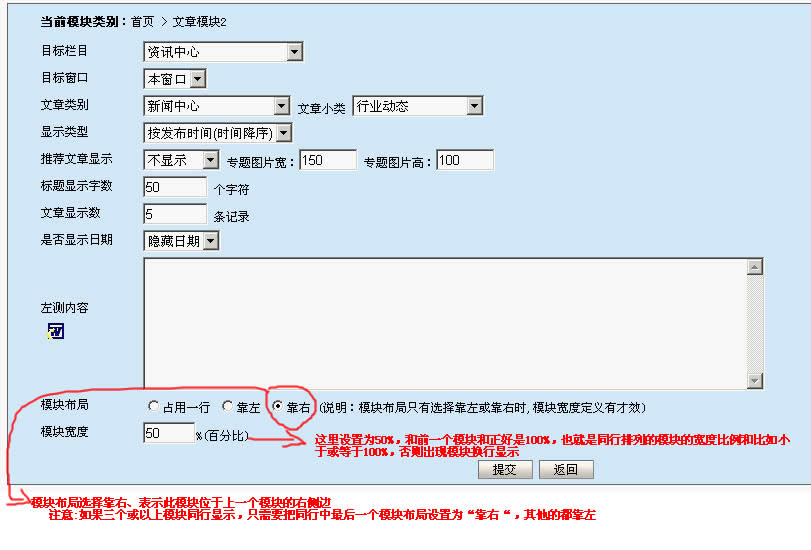
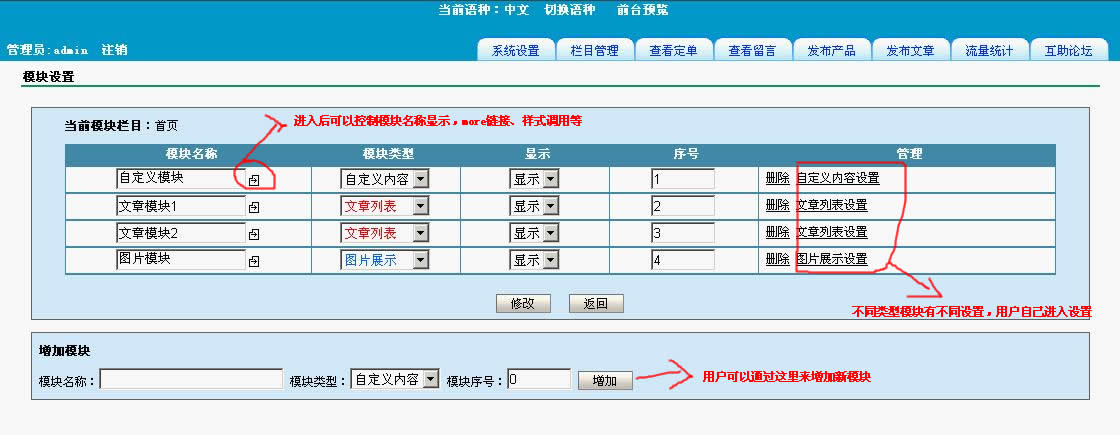 2、模块增加后默认是占用一行的,如何是文章模块1和文章模块2并列在一行显示呢?看下图说明
 2.1、下面先进入文章模块1的文章列表设置中,如下所示
2.2、下面先进入文章模块2的文章列表设置中,如下所示
到这里后首页结构已经全部完成,其他栏目设置方式也差不多,其他栏目的内容一般主要在导航设置中的子栏目里面调整,能把首页结构制作看懂,其他栏目就容易多了。
pfreestar - 2009/5/7 13:12:00
有的主机会出现权限不够的问题,原因是主机商吧安全级设置过高
C:\WINDOWS\Microsoft.NET\Framework\v2.0.50727\CONFIG\web.config
找到上面的asp.net的配置文件,注意不同版本红色部分目录可能不一样
找到下面这段
<location allowOverride="false">
<system.web>
<securityPolicy>
<trustLevel name="Full" policyFile="internal"/>
<trustLevel name="High" policyFile="web_hightrust.config"/>
<trustLevel name="Medium" policyFile="web_mediumtrust.config"/>
<trustLevel name="Low" policyFile="web_lowtrust.config"/>
<trustLevel name="Minimal" policyFile="web_minimaltrust.config"/>
</securityPolicy>
<trust level="Full" originUrl=""/>
<identity impersonate="true"/>
</system.web>
</location>
红色部分level必须设置为full,有的主机商吧这里设置为Medium,会提示安全性错误。
huawx - 2009/5/7 17:32:00
明白了一些,要有具体的JS调用就好的,这个系统我想会强大起来,我们努力,
hanyu819 - 2009/5/7 20:06:00
:) 支持!
xinghua39 - 2009/5/11 12:00:00
怎么不能初始化呀
mimi5109 - 2009/5/12 15:44:00
辛苦了!!学习中
xfnht - 2009/5/13 10:58:00
这些教程对 有心人有用, 懒人没多大用处, 哈哈,偶有时也有点小懒,遇到问题不仔细看就发贴问, 但有时确实一些简单的小细节,小技巧不知道,还请有心人多帮忙
ghost - 2009/5/14 1:39:00
今天在chinaz发现的,第一眼看很大气,马上上官方来了,下载,本地安装,确实不错,速度贼快
smtlzy - 2009/5/16 1:50:00
第一次来我是菜鸟。不懂安装。不过我顶
qianhui602 - 2009/5/17 18:43:00
支持下
dianthus - 2009/5/18 11:05:00
学习了
sushui1982 - 2009/5/23 22:30:00
:strong:
sanyeew - 2009/5/28 14:48:00
确实不错,呵呵,功能灵活,唯一就是模板不好制作,
叶中网络 - 2009/6/1 8:55:00
很精辟,支持!
9001080 - 2009/6/4 23:20:00
顶顶。。。
gdpnwzh - 2009/6/8 15:15:00
来顶顶
andihuang - 2009/6/9 14:57:00
顶下~~~
看看~~~
qiankun_0960 - 2009/6/9 17:27:00
精辟,多教教新手们哦。我也是刚接触这个系统不久。大家多多指教!
fany1987 - 2009/6/16 22:52:00
顶下!
rte12 - 2009/6/20 16:18:00
俺过来是帮忙顶上去的
bluetager - 2009/6/21 10:49:00
顶~!好·!
bluetager - 2009/6/23 12:37:00
受教,谢谢
needfire - 2009/7/2 9:36:00
我是新菜鸟。。 正在不断学习中
fengjian60 - 2009/7/5 15:52:00
关于More 我还是不会
xym93110 - 2009/7/5 17:19:00
顶一下!……刚下学啊!
拖罗 - 2009/7/5 23:34:00
不错。有教程。
510746 - 2009/7/7 23:00:00
显示这样的-----
Server Error in '/' Application.
--------------------------------------------------------------------------------
Access to the path 'E:\Vhost\webroot\fangwenboshi.cn\upload\product\2009-01\03094643.jpg' is denied.
Description: An unhandled exception occurred during the execution of the current web request. Please review the stack trace for more information about the error and where it originated in the code.
Exception Details: System.UnauthorizedAccessException: Access to the path 'E:\Vhost\webroot\fangwenboshi.cn\upload\product\2009-01\03094643.jpg' is denied.
ASP.NET is not authorized to access the requested resource. Consider granting access rights to the resource to the ASP.NET request identity. ASP.NET has a base process identity (typically {MACHINE}\ASPNET on IIS 5 or Network Service on IIS 6) that is used if the application is not impersonating. If the application is impersonating via <identity impersonate="true"/>, the identity will be the anonymous user (typically IUSR_MACHINENAME) or the authenticated request user.
To grant ASP.NET access to a file, right-click the file in Explorer, choose "Properties" and select the Security tab. Click "Add" to add the appropriate user or group. Highlight the ASP.NET account, and check the boxes for the desired access.
Source Error:
An unhandled exception was generated during the execution of the current web request. Information regarding the origin and location of the exception can be identified using the exception stack trace below.
Stack Trace:
[UnauthorizedAccessException: Access to the path 'E:\Vhost\webroot\fangwenboshi.cn\upload\product\2009-01\03094643.jpg' is denied.]
System.IO.__Error.WinIOError(Int32 errorCode, String maybeFullPath) +2014755
System.IO.File.Delete(String path) +157
PageAdmin.product_3.Data_Delete(Object sender, CommandEventArgs e) +303
System.Web.UI.WebControls.LinkButton.OnCommand(CommandEventArgs e) +105
System.Web.UI.WebControls.LinkButton.RaisePostBackEvent(String eventArgument) +163
System.Web.UI.WebControls.LinkButton.System.Web.UI.IPostBackEventHandler.RaisePostBackEvent(String eventArgument) +7
System.Web.UI.Page.RaisePostBackEvent(IPostBackEventHandler sourceControl, String eventArgument) +11
System.Web.UI.Page.RaisePostBackEvent(NameValueCollection postData) +174
System.Web.UI.Page.ProcessRequestMain(Boolean includeStagesBeforeAsyncPoint, Boolean includeStagesAfterAsyncPoint) +5102
--------------------------------------------------------------------------------
