产品使用及交流论坛
dimi - 2008/11/27 0:47:00
先安装好iis(winxp系统安装iis5.1,win2000安装iis5.0,win2003以上的可以安装IIS6.0) 安装好IIS后再安装好framework2.0或以上版本,这两个软件的下载可以上百度搜索,安装方法也可以搜索得到,下面直接说配置方法。
1、首先打开 IIS (控制面板 》》 管理工具 》》 Internet 信息服务),右键属性


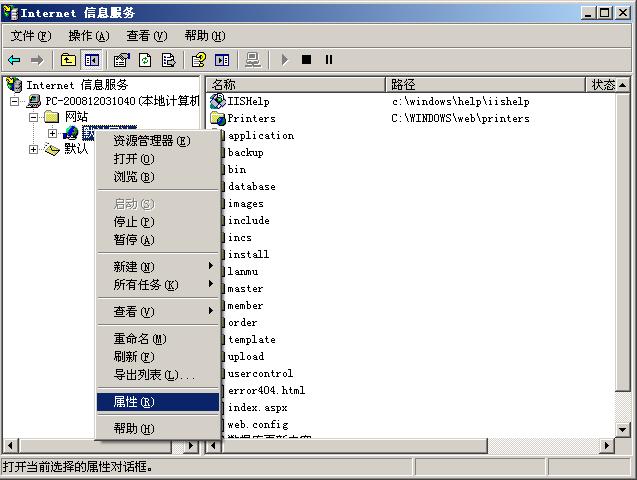
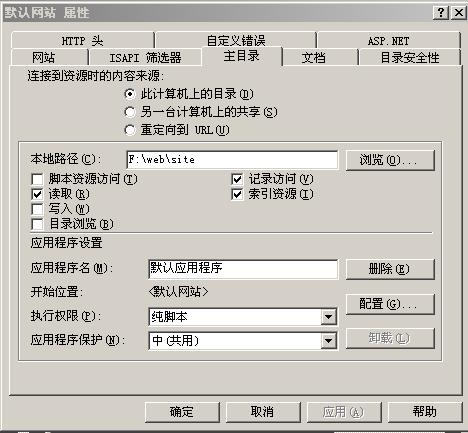
2、点击“主目录”选项卡,路径设置为你pageadmin目录所在文件路径,我的放在F:\web\site这里。<BR>
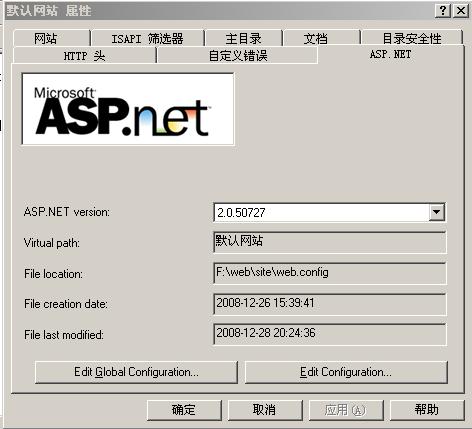
3、然后点击”asp.net“选项卡,asp.net version选择2.0的,如果你是更高版本,也可以选择更高版本的,高于1.1的版本都行
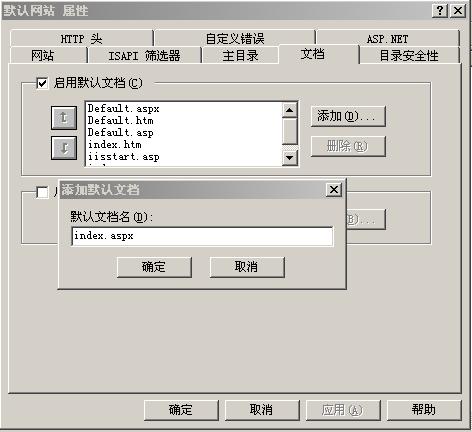
4、然后点击“文档“选项卡,点添加增加一个index.aspx的默认文档
5、找到网站存放的目录 ,也就是文件夹,
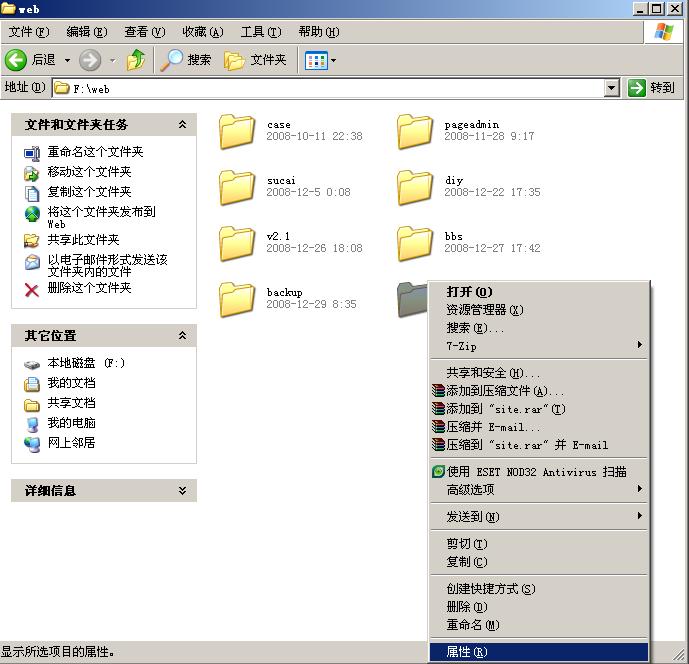
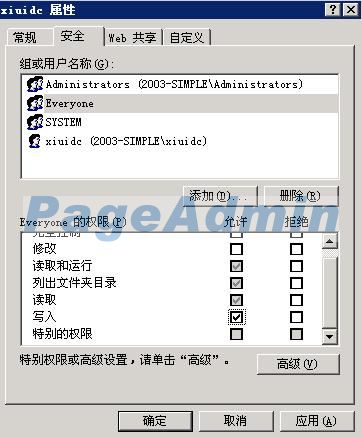
右键 属性,找到”安全“选项卡,舔加一个名为everyone的用户,然后确定(如果XP系统找不到”安全“选项卡,请看这个帖子:
http://bbs.pageadmin.net/showtopic.aspx?topicid=234&forumpage=1点击安全选项卡后,选择 everyone用户(没有这个用户可以自己添加),勾选 下面的 读取和写入权限就可以,或者直接勾选完全控制。
 注意:
注意:网站目录一定要有写权限,否则安装过程中会出现Access to the path '......\web.Config' is denied等错误
本机不会配置可以直接购买支持NET2.0的虚拟主机,把系统上传到虚拟主机上即可
虚拟主机和域名注册网站:
http://www.18inter.com
dlink530 - 2009/1/3 19:40:00
edeile - 2009/1/13 16:30:00
谢谢老大!首页左下角的联系方式怎么改?
55aa - 2009/2/3 9:11:00
谢谢,回去试试看
pageadmin - 2009/2/10 9:57:00
外置猫 - 2009/4/1 22:03:00
顶一下,做个记号
pfreestar - 2009/4/5 9:53:00
非常感谢楼上,辛苦了:)
high - 2009/4/5 19:13:00
我在安装PageAdmin网站系统时出现以下错误提示:Server Error in '/PageAdmin' Application.
Object reference not set to an instance of an object. Description: An unhandled exception occurred during the execution of the current web request. Please review the stack trace for more information about the error and where it originated in the code.
Exception Details: System.NullReferenceException: Object reference not set to an instance of an object.
Source Error:
| An unhandled exception was generated during the execution of the current web request. Information regarding the origin and location of the exception can be identified using the exception stack trace below. |
Stack Trace:
| [NullReferenceException: Object reference not set to an instance of an object.] PageAdmin.Install.Update_Config() +184 PageAdmin.Install.Next_2(Object src, EventArgs e) +10 System.Web.UI.WebControls.Button.OnClick(EventArgs e) +105 System.Web.UI.WebControls.Button.RaisePostBackEvent(String eventArgument) +107 System.Web.UI.WebControls.Button.System.Web.UI.IPostBackEventHandler.RaisePostBackEvent(String eventArgument) +7 System.Web.UI.Page.RaisePostBackEvent(IPostBackEventHandler sourceControl, String eventArgument) +11 System.Web.UI.Page.RaisePostBackEvent(NameValueCollection postData) +33 System.Web.UI.Page.ProcessRequestMain(Boolean includeStagesBeforeAsyncPoint, Boolean includeStagesAfterAsyncPoint) +1746 |
Version Information: Microsoft .NET Framework Version:2.0.50727.1433; ASP.NET Version:2.0.50727.1433
=====》请问应该如何解决?谢谢!
星河之心 - 2009/4/7 16:21:00
同上 我也是这个错误!!
aixin8818 - 2009/4/8 11:48:00
我昨天调试的好好的,朋友玩电脑中毒后,重新装系统调试,运行文件就提示
Server Application Unavailable
The web application you are attempting to access on this web server is currently unavailable. Please hit the "Refresh" button in your web browser to retry your request.
Administrator Note: An error message detailing the cause of this specific request failure can be found in the application event log of the web server. Please review this log entry to discover what caused this error to occur.
请问哪里出错,谢谢
3759777 - 2009/4/23 9:12:00
我的同楼上一样啊
:~
target2009 - 2009/4/23 10:54:00
顶。。。老大,,,收徒弟吗!很喜欢你做地模版,能不能教教我
sunpchen - 2009/4/24 11:03:00
好贴,一定要顶上去
xyelyz - 2009/5/3 0:42:00
:) 今天第一次来到这里,原来有这么详细的教程,真是太好了,谢谢楼主!
9526204 - 2009/5/3 17:01:00
Server Application Unavailable The web application you are attempting to access on this web server is currently unavailable. Please hit the "Refresh" button in your web browser to retry your request. Administrator Note: An error message detailing the cause of this specific request failure can be found in the application event log of the web server. Please review this log entry to discover what caused this error to occur.
如果把主目录移动,改位置文件c:\inetpub\wwwroot,可以打开
http://localhost/install/index.aspx,和
http://localhost/localhost.asp, 可是
http://localhost/install/index.aspx打开后输入管理密码等位置都没有,网页静态的
请帮助!!!!!!!!!!!急跪求~~~
estami - 2009/5/10 0:30:00
Server Application Unavailable :D 我找到法子了
estami - 2009/5/10 0:31:00
1.在安装IIS和VS2005时的顺序问题,一般的先安装IIS 再安装VS2005时 会自动配置好IIS 无须手动配置。如果是后安装的IIS 或者重装过IIS 则需要手动配置IIS(IIS需要完全安装所有组件) 方法如下:(以系统盘为C盘为例)
停止IIS服务
运行CMD-键入 cd C:\WINDOWS\Microsoft.NET\Framework\v2.0.50727 然后键入aspnet_regiis.exe -i 安装完成后键入aspnet_regiis.exe -r
启动IIS服务
2.如果执行第一步还是报错,则继续同步IIS密码
在CMD中 cd c:\inetpub\adminscripts 然后cscript synciwam.vbs -v
执行结果如下:
IIS Applications Defined:
Name, AppIsolated, Package ID
w3svc, 0, {3D14228C-FBE1-11d0-995D-00C04FD919C1}
ROOT, 2,
IISHelp, 2,
Out of process applications defined:
Count: 1
{3D14228D-FBE1-11d0-995D-00C04FD919C1}
Updating Applications:
Name: IIS Out-Of-Process Pooled Applications Key: {3D14228D-FBE1-11D0-995D-00C04
FD919C1}
或者类似则成功 否则报错ERROR 8004e00f则继续
3.首先进入组件服务,查看组件服务-/计算机-我的电脑-COM+应用程序,结果报错“COM+ 无法与 Microsoft 分布式事务协调程序交谈,错误代码8004e00f”,无法查看里面的对象。
进入事件查看器,发现msdtc服务没有正常启动。
下面需要删除注册表中以下键:
• HKEY_LOCAL_MACHINE/SYSTEM/CurrentControlSet/Services/MSDTC
• HKEY_LOCAL_MACHINE/SOFTWARE/Microsoft/MSDTC
• HKEY_CLASSES_ROOT/CID
然后停止MSDTC服务:在CMD中 net stop msdtc
卸载MSDTC服务: msdtc -uninstall
重新安装MSDTC服务: msdtc -install
启动MSDTC服务: net start msdtc
看到提示 请求的服务已启动芸芸则msdtc服务已经正常启动
重做第2步
4.经过前3步 还未成功的话 在事件查看器中出现警告“服务器无法加载应用程序 '/LM/W3SVC”
在CMD下执行
cd %windir%\system32\inetsrv 然后rundll32 wamreg.dll
然后regsvr32 asptxn.dll
然后重启机器 问题就解决了
xinghua39 - 2009/5/11 11:12:00
iis都配置了 但后台还是进不去呀
http://localhost/install/index.aspx
leiren01 - 2009/5/12 0:31:00
No web site is configured at this address.
我的出来这样
hnjzsyf - 2009/5/12 14:54:00
Server Application Unavailable
The web application you are attempting to access on this web server is currently unavailable. Please hit the "Refresh" button in your web browser to retry your request.
Administrator Note: An error message detailing the cause of this specific request failure can be found in the application event log of the web server. Please review this log entry to discover what caused this error to occur.
怎么办?
lover196201 - 2009/5/21 13:57:00
点下一步根本没反应,直接输入index.aspx?=2就出现第2步,但是点下一步时还是没反映,等半天出来一个错误:severice unabaile
后台也登陆不了
可是能输入login.aspx到登陆界面
前台运行也有点慢
lover196201 - 2009/5/21 14:21:00
有什么办法能不这样吗?
lmx - 2009/5/21 14:57:00
Server Error in '/install' Application.
--------------------------------------------------------------------------------
Parser Error
Description: An error occurred during the parsing of a resource required to service this request. Please review the following specific parse error details and modify your source file appropriately.
Parser Error Message: Could not load type 'PageAdmin.Install'.
Source Error:
Line 1: <% @ Page language="c#" Inherits="PageAdmin.Install"%>
Line 2: <HTML>
Line 3: <HEAD>
Source File: /install/index.aspx Line: 1
--------------------------------------------------------------------------------
Version Information: Microsoft .NET Framework Version:2.0.50727.42; ASP.NET Version:2.0.50727.42
snnu204 - 2009/5/21 16:42:00
很感谢,我慢慢弄!
xiaorenme231 - 2009/5/23 14:56:00
还是不行啊,郁闷中!!!
sanweilipin - 2009/6/13 20:21:00
我用SQL数据库初始化网站的时候出现的。谢谢!!!!
bluetager - 2009/6/23 11:15:00
学习,顶~!
hjj168268 - 2009/6/24 0:56:00
最后建出来是什么样子的?可以发一个例子来看看吗?老大?
jabbjabb - 2009/6/26 16:40:00
iis都配置了 后台进不去呀
http://localhost/install/index.aspx
请版主帮忙

 / C1 Z( Q! N* u- F
 ' q# G! i! S3 P. E
 2 k0 n. s5 V, s6 R& O" ^# E2 ^7 o; [0 I

 : P9 M7 D! w9 b" m6 q
 ' u$ H f: ]5 h j, L U
 7 L; f2 [! R( s' N) R
 - W: P6 E. V8 h* u! x
 " B, O; ~! `" @; U. e
 ) J6 h0 d i) c


 ; a8 n' y* B3 i5 |0 l
 7 F' U! s) t7 v2 n