本人小白
向高人致敬请教
我想在网站首页做一个客户留言模块收集信息,模块引用在线留言表单模型,做出来的效果如下图

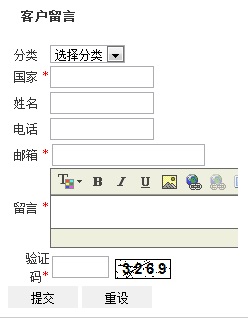
,但我想做到这个效果
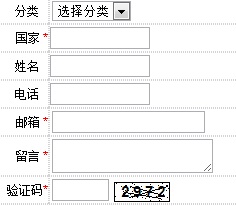
,就是留言内容不显示编辑,只显示方框,该怎么修改程序
代码:
<strong><span style="font-size: 13px;"> 客户留言</span></strong><br />
<br />
<script type='text/javascript' src='/e/js/zdyform.js'></script>
<form name="feedback" method="post" enctype="multipart/form-data" action="/e/aspx/post.aspx">
<table border="0" cellpadding="0" cellspacing="0" align="center" width="150%" height="10">
<tbody>
<tr>
<td align="right">分类 </td>
<td><select name="sort" id="sort">
<option value="">选择分类</option>
<option value="555">|-咨询</option>
<option value="556">|-建议</option>
<option value="557">|-投诉</option>
<option value="558">|-其他</option>
</select></td>
</tr>
<tr>
<td align="right">国家 <span style="color

ff0000">*</span></td>
<td><input type="text" name="title" id="title" value="" style="width:100px" maxlength="50" /></td>
</tr>
<tr>
<td align="right">姓名 </td>
<td><input type="text" name="pa_truename" id="pa_truename" value="" style="width:100px" maxlength="50" /></td>
</tr>
<tr>
<td align="right">电话 </td>
<td><input type="text" name="pa_tel" id="pa_tel" value="" style="width:100px" maxlength="50" /></td>
</tr>
<tr>
<td align="right">邮箱 <span style="color
ff0000">*</span></td>
<td><input type="text" name="email" id="email" value="" style="" onblur="if(!IsEmail(this.value)){alert('无效的邮件格式');document.letter.fbk_email.value=''}" maxlength="50" /></td>
</tr>
<tr>
<td align="right">留言 <span style="color
ff0000">*</span></td>
<td><textarea name="content" id="content" style="250"></textarea></td>
</tr>
<script type='text/javascript'
src='/e/incs/fckeditor/fckeditor.js'></script><script type='text/javascript'>var FCKeditor
= new FCKeditor('content');FCKeditor.BasePath = '/e/incs/fckeditor/';FCKeditor.Height
=60;FCKeditor.Config['LinkBrowser']= false;FCKeditor.Config['ImageBrowser']
=false;FCKeditor.Config['FlashBrowser']=false;FCKeditor.Config['LinkUpload'] =
false;FCKeditor.Config['ImageUpload'] =false;FCKeditor.Config['FlashUpload']
=false;FCKeditor.ToolbarSet ='Small';FCKeditor.ReplaceTextarea();</script>
<tr>
<td align="right">验证码<span style="color
ff0000">*</span></td>
<td><input type="text" name="vcode" id="vcode" maxlength="4" size="4" /> <img src="/e/aspx/yzm.aspx" onclick="Code_Change('vcode_img')" align="absmiddle" border="0" id="vcode_img" style="cursor:pointer" alt="点击更换" /></td>
</tr>
<tr>
<td colspan="2" style="text-align: left;"><input type="hidden" name="checked" value="0" /><input type="hidden" name="showcode" value="0" /><input type="hidden" name="to" value="" /><input type="hidden" name="mailto" value="" /><input type="hidden" name="mailreply" value="" /><input type="hidden" name="mailsubject" value="" /><input type="hidden" name="mailbody" value="" /><input type="hidden" name="sendmail" value="0" /><input type="hidden" name="insertdatabase" value="1" /><input type="hidden" name="siteid" value="1" /><input type="hidden" name="formtable" value="feedback" /><input type="hidden" name="mustname" value="国家,邮箱,留言," /><input type="hidden" name="mustfield" value="title,email,content," /><input type="hidden" name="musttype" value="text,text,editor," /><input type="button" class="bt" value=" 提交 " onclick="return set_feedback()" /> <input type="reset" value=" 重设 " class="bt" /></td>
</tr>
</tbody>
</table>
</form>
<script type="text/javascript">
function set_feedback()
{
document.forms["feedback"].mailto.value="";
document.forms["feedback"].mailreply.value="";
document.forms["feedback"].mailsubject.value="";
document.forms["feedback"].mailbody.value="";
return Check_ZdyForm("feedback");
}
function feedback_zdycheck(){
return true;
}
</script>


